Saturday, October 27, 2012

HowTo Cut, Make Nano SIM for iPhone 5

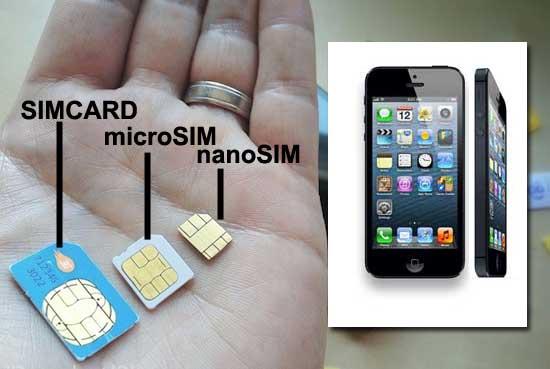
The smaller SIM standard goes even more smaller as Apple trims the iPhone’s thickness by 18%.
Your existing normal SIM or Micro SIM can be converted to Nano SIM by following simple steps. To do this, you have two options: DIY or visit your wireless network’s local customer service center and get them to replace your current SIM with a Nano SIM. But we know if you came to this DIY guide, your intent is to Do It Yourself, lets get started
What you need:
  • A printer (Colored or monochrome)
  • A4-sized sheet
  • Tape
  • Ruler and marker
  • Good Scissors
  • Sandpaper or file
  • Patience & accuracy
Warning: This needs high ability of accuracy in one’s hands. Not everyone is blessed with that. We will not be held responsible if you damage your SIM card.

How to Make Nano SIM card for iPhone 5

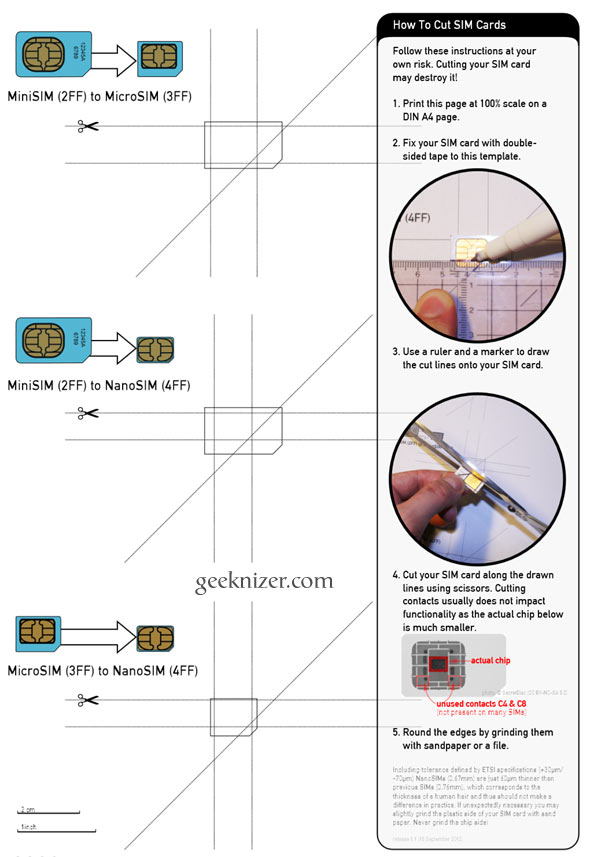
Step 1: Download & print PDF at 100% scale on an A4 page.
Step 2: Accurately place your current SIM card on the designated area. If you have a Mini SIM, place it on the second highlighted area. If you have Micro SIM, place it on the third and last. When you’re sure it matches the outlines, stick the SIM to paper using  a tape.
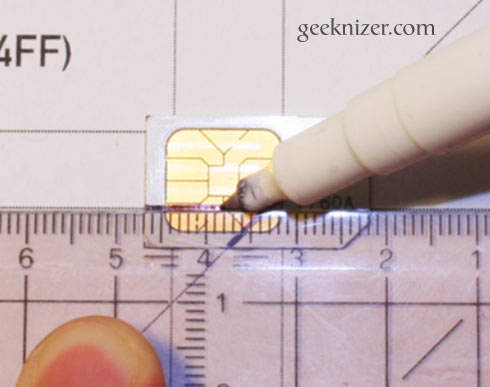
Step 3: Using a ruler and a marke, carefully mark the five lines along which you would cut in the following step.
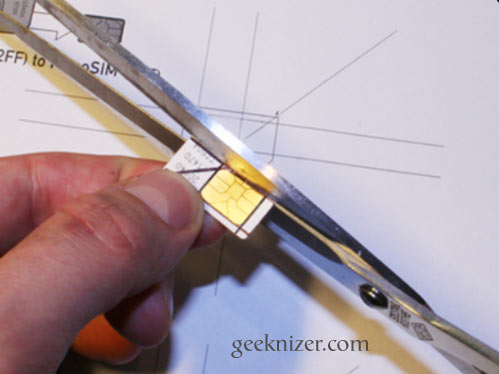
Step 4: Use the scissor to carefully cut across the marked lines. You really need to be slow and 
    accurate. Single mistake can damage your SIM card. Ask your mom if you’ve to, she might be able to do it better.
Step 5: Using a file or sand paper, Smooth out the edges of your Nano SIM.
Bingo, you have successfully made Nano SIM for your iPhone 5.
Apple has really left no plastic area on the SIM card. Its hard to say what they would have in the iPhone 6. Perhaps a pico-SIM or femto-SIM card.

Tuesday, October 16, 2012

Not Just Email: Your Voice Mail Can Be Hacked, Too - Here's How To Secure It


secure voice mail
Much has been made throughout 2011 and 2012 of the dangers of phone hacking. While many of the victims of the practice - in this case sponsored by major news organizations - were celebrities, politicians and sportsmen, many more were real, regular people who may or may not have been involved with slightly more famous people, one way or another.
In the UK, USA and Australia, investigations are ongoing into these practices, but let's step back a moment. You might have read with interest (perhaps even glee) about these cases, but what if it happened to you? Would you like to be a phone hacking victim?
The vast majority of those hacked had no idea how reporters knew so much about them. There is a simple reason for this - they didn't know that their cell phone voicemail was not secured. Upon spending several hundred dollars on phones, they had like many other people assumed that the device was secure.
Voicemail security is not something that appears to be a priority for mobile phone networks, which is why it is something that users should be proactive about. Anyone's phone can be hacked - if it was easy for journalists, it would be easy for anyone to do...

Keep Your Phone Locked & Voicemail Secure

Forget about the "I've got nothing to hide" mantra - you do. Social security numbers, bank account numbers, credit cards, insurance, mortgages... and that's just a small aspect of the financial side of your life. We all have something to hide, and with good reason. As we've seen in the newspapers and TV news reports, there is no doubt that this information can be filtered out of mobile phone voicemail messages, which is why you should keep your voicemail secure.
secure voice mail
Phone hackers were able to get into voicemail records by dialing a generic number from a mobile and then keying in a PIN. But even this practice can be simplified if you leave your mobile lying around. Hackers (hired by reporters in the famous cases that saw British newspaper News of the World closed down following public outrage or even journalists themselves) have no scruples when it comes to doing their job.
In order to prevent interference and hacking, remember to set an unlock password on your phone. Once you've done this, set a voicemail password. In most cases you should be able to do this manually, but if not contact your mobile network.
  • On an iPhone, open Settings > Phone > Change Voicemail Password and make the change.
  • In Android, use Apps > Settings > Call > Voicemail settings to change your voicemail password.
  • Windows Phone users can open Settings > swipe left to Phone and tap Voicemail number to edit.
  • On BlackBerry, use Options > Voicemail settings to configure a new password.
When you set a new password for voicemail, make sure that it is secure. You shouldn't need to memorize it as your phone will store the information, but you will need to ensure that your phone's lock code is secure.

The Usual Principles of Security

secure voice mail
The following passwords are extremely popular on mobile phones:
  • 1234
  • 0000
  • 2580 (the middle column of numbers on a telephone keypad)
  • 1111
  • 5555
  • 5683 (Spells "LOVE")
  • 0852 (the middle column of numbers on a telephone keypad in reverse)
  • 2222
  • 1212
  • 1998
As such, these should be avoided! Also you should think beyond birth years for yourself or those close to you. It's a good tactic to set a password and ask a close friend if they can guess it. If they do, think again!
The usual principles of setting a PIN should apply. Not only should it be hard to guess and apparently random, it should be unique to your phone. The tactics used by reports and private investigators in the phone hacking scandal were occasionally those used by phishing scammers - calling up people to gain personal information from which a password or PIN might be guessed.
In light of this, maintaining completely different passwords for all of your various telephone and online accounts is vital, if slightly tricky to achieve. Additionally, you should change passwords regularly.
Remember too that voicemail hacking can be done from your own phone if the device is left unsecured and there is no unlock PIN setup. Should someone walk off with your phone there are various tools that you can use to remotely locate, reset and wipe the device. Of course, by then, it might be too late...

Have No Doubts!

It is simple to change your voicemail PIN, but it is easily overlooked. The famous names whose personal lives have been exposed (over the past 20 years or so) prove that people trust devices in their possession far more than they should.
secure voice mail
Whether you're an average Joe with a few dollars in the bank or the sister of a football player, you need to make sure that your phone voicemail is secure. Messages from banks, lovers, car dealers, retailers and hospitals can be used to the benefit of all manner of criminals, from unscrupulous journalists to the online mafia.
Change your voicemail PIN, make it tough to break, and regularly alter it. If there is any doubt about the strength and quality of your voicemail PIN and mobile phone lock code, you can be sure that someone else will be able to break it.

What Is Wireless Charging & How Exactly Does It Work?


wireless charging
We live in a wireless world. Except we don't. Sure, we can send huge amounts of information across the airwaves, but the devices capable of sending and receiving it are tied down to power cords. Batteries allow some freedom but, eventually, we all have to come back around to the familiar face of the power outlet.
What if we didn't? What if we could charge anywhere, at any time? This is the promise of wireless charging, a concept that seems ripped from sci-fi. But it's not - it's real, and it's available today. Let's look at the reality and see what this technology can and can't accomplish.

How Wireless Charging Works

wireless charging
The term "wireless charging" usually refers to inductive charging. This technology uses a charging station that creates an alternating magnetic field. A device with the proper induction coil will receive energy from that field when it is placed nearby, making it receive power without a physical connection.
Cordless toothbrushes and other bathroom devices have used inductive charging for a long time. The technology has traditionally had problems with low efficiency and slow charging, but these were not considered a disadvantage for bathroom appliances that might be used for only a few minutes every day. Using inductive charging is safer, as well, because the conducting material is not exposed. Touch it with a wet hand? No problem.
Inductive charging is not magic. It needs specific hardware to function, and that hardware must be built into a device. Most devices do not have inductive charging coils built in to them, so a sleeve or adapter must be attached to enable inductive charging.

The Disadvantages Of Inductive Charging

wireless charging pads
Inductive charging relies on magnetic fields. These can be strong but often have a short range of effect unless an incredible source of magnetism is available (the Earth has a magnetic field only because it also has a huge molten metal core). Small inductive charging stations are no different.
Let's use a wireless toothbrush as an example. You place it on the stand and it charges. The contact between your toothbrush and the stand is not responsible for charging, however. It just seems that way because the field used to charge the toothbrush is so weak that its range is best measured in millimeters.
Charge speed and efficiency remain problems, as well. Attempting to charge a device using induction charging just isn't as efficient as a direct, physical connection.
And then there's the inductive coil. Though small and becoming smaller, it's still a sizable piece of kit relative to the space available in a modern smartphone, tablet or ultrabook. This is a problem that will diminish with time but is relevant to today's devices.

Wireless Charging Comes To The Mass Market

wireless charging pads
The lack of a common standard is another reason why wireless charging never gained much traction in consumer electronics. It wasn't so long ago that most devices still relied on Ethernet cords for data and mobile broadband was restricted to ridiculously slow speeds. Wireless charging did not seem important before wireless communications.
That has changed thanks to the Wireless Power Consortium and its Qi (pronounced "chee") standard. The WPC is an industry organization sponsored by various companies all seeking a standard for wireless charging. Its members include every big name in the mobile market besides Apple.
I talked about Qi Wireless after attending CES 2012. I was able to see a number of working prototypes as well as existing products that used wireless charging. These prototypes and niche solutions are now becoming a reality is mass market products. Nokia, for example, recently announced is new Lumia 920 will have wireless charging built in. The less expensive Lumia 820 will have an optional shell that enables the technology.
It's clear that there is a future for wireless charging. There's a lot of industry support behind WPC and a desire to bring the feature to market. We'll likely see a number of additional devices with wireless charging announced this year and next.

The Future Of Wireless Charging

wireless charging
Current inductive charging can be convenient, but the lack of range is a problem. It diminishes the technology to a convenience rather than a revolution.
Will this change? Maybe. There's been plenty of research into the potential of long range wireless power and many different technologies have been used to achieve it. Lasers, microwaves and more powerful variants of inductive charging have been able to achieve longer transmission distances. Disadvantages have hampered wide-spread adoption. Tripping over a laser used for wireless power transfer, for example, could result in a vaporized foot.
It's hard to say where a breakthrough in this field will come from. Apple is one candidate because the company has patented a device that can allegedly power devices at ranges up to one meter. The Wireless Power Consortium is also continually looking into better options. And then there's Intel, who recently announced that it is working with Integrated Device Technology on a magnetic device that would be placed in a laptop and deliver power to nearby smartphones and peripherals.
Or a breakthrough could come from a small engineering company that's barely known. This is a tough technical problem that will require both creative thinking and significant engineering know-how to solve. A major corporation may not be the first to find a solution.

Conclusion

Wireless charging has huge potential. This is why people have been working on it for well over a century. If we could move power without wires we'd be able to re-think not just consumer electronics but the infrastructure used by the entire human race.
Alas, we're not there yet, but the renewed interest in this field brought by consumer electronics is appreciated. Perhaps the eternal quest of endless convenience can finally crack this technology wide open.

How To Remove Spam Apps & Ensure App Privacy


remove spam apps facebook
Apps on Facebook can be great, but they can also be a right pain in the neck. On one hand, there's useful apps like Spotify or Last.fm which make it easy to share your music taste with your friends. Mostly these are welcomed and vaguely interesting for the friends to view. On the other hand, there's annoying games and spammy viral apps that post things on your timeline.
There are several ways to clean up the apps you're using and ensure your privacy settings for apps are set just right. There are also some easy ways to remove and report applications when required - like when you've accidentally clicked on a viral scam app. Here's what you need to know.

Setting Privacy For Applications

When your absent-minded friend installs yet another dodgy application, how much information do you want the developers to find out about you? And what about this way around - if you're using a new game, how much information do you want the developers to know about your family? Your grandmother? Your kids?
This is the reason people need to check privacy settings for applications. Until you lock down your privacy, you never really know what information is being collected about you and your friends via apps you or your friends may have installed. Scary, isn't it?
remove spam apps facebook
Go to the drop-down menu in the top right of Facebook and choose "Privacy Settings", then choose to edit the settings for "Ads, Apps and Websites". From here you can choose exactly what information can be seen by applications your friends install. Since you don't know anything about the developers of most apps or what your friends might install, un-checking most of these boxes is a great idea. Then, if you care about your family and friends, teach them how to do this too.
remove spam applications facebook

Clean Up Your Apps

There are two main ways to get a list of all your apps. Firstly, you could go to the arrow at the top-right of Facebook and choose "Account settings" and then choose "Applications". Secondly, you could navigate from the Facebook Home page to the "App Center" using the links on the left hand side, then choosing "My Apps" from the menu on the left.
remove spam applications facebook
Either of these options will give you a list of all the applications you have authorised for your account. Although, the second method has the option of sorting by "Last used", which is handy when searching for something you recently added or got annoyed by. To remove the applications, just click on the cross to the right of each application. Remove anything that looks suspicious, unfamiliar or unused and you could clean up your apps in no time. And don't worry, if you remove something useful it can always be added again later. It's no big deal.

How To Get A Spam App Off Your Timeline Wall

It happens all the time. People see an update in their feed from a friend claiming to let them view a certain video or see who looks at your Facebook profile. They click on it impulsively because they're curious and instantly they have posted that same update on to all their friends. The viral app continues to annoy and intrigue their friends and the cycle continues. So, how do you get rid of it?
remove spam facebook
Every update on your timeline can be removed and the application may be reported as spam. Simply head to your timeline and click on the edit pencil in the top-right of the update. The menu for an update will show a "Remove" option and a "Report Spam" option, while a clustered bundle of information from an application will show options to "Remove Application" or "Mark As Spam". If you accidentally remove the post first, you can use the methods above for cleaning up your apps to remove the app, which should show as recently used.

Never Get An App Request From THAT Person/App Again

If you hate getting reminders and requests from apps, there's an easy way to block them. Head to the Facebook Home page and choose "App Center" from the menu on the left, then "Requests ". You'll see a list of all your recent requests from apps. From here it's simple - just click on the cross to the right of a request and it will give you the option to block the application completely.
Or if you're always getting requests from the same person, you can block that person's requests completely instead.
remove spam facebook


How To Hide Your Personal Information On Facebook

In the age of the Internet, privacy is a luxury and you have to constantly be on your heels to maintain it. Facebook makes it particularly hard for users to guard their personal data. Despite many changes, Facebook privacy settings remain complicated. Moreover, past updates have unexpectedly made previously private information available to the public.
Well, no stranger needs to know your email address, phone number, or see your family pictures. In this article I show how you can check what the public can see of you on Facebook. I also explain how you can control which of your information is visible.

What Information Can The Public See?

Do you think your profile is all locked up and the public cannot see anything they shouldn't? Well, how about we check it out, just to be sure!
Go to your Facebook Timeline, i.e. the page that is shown when you click your own name on Facebook. While you are logged in, you will of course see everything. In the top right of your profile summary that heads the Timeline, you should see a Settings icon next to the Activity Log button. Click Settings and select View As...
hide facebook info
This reveals what your Facebook Timeline looks like to a complete stranger. You can also test the view for specific people, by entering their names in the respective field in the top left.
hide facebook information public
The Timeline is one thing, but what you should really check is your About page. So while viewing your Timeline from the public's perspective, click About in the bottom left of the header. This is where Facebook potentially reveals your contact information, your employer, your education, where you live etc.
Something else you should check is what other parts of your Facebook profile are available to strangers by clicking the About button in the top left. This could include your friends list, your photos, your likes, subscriptions, events you are attending, your notes, and music.
So did you spot anything you didn't want the public to see?

How Can I Remove Items From Public View?

For most content, Facebook makes privacy control fairly easy.
Let's start with your About page. Return to this page in your normal logged in view. Notice there is an Edit button in the top right of every box. An exception is your history because it only aggregates available information. Click Edit for an item you want to change, then click the little symbols next to each entry to control who can see this information. You can choose from a few default options, including Friends or Only Me . You can also make the information available to custom lists of friends. Don't forget to hit Save every time you change a setting.
hide facebook information public
Curious about how to create custom lists of friends? Find out how you can use Facebook Friends Lists For Interests Or Circles.
Next, we will look at Photos. You can control the privacy for each photo individually. This is good to know because you cannot control the privacy level for the Profile Pictures album. To change its visibility, open a photo and click the Edit button on the right. Now you can change the description, location, date, and select who can see the photo. Click the Done Editing button to save your changes.
hide facebook information public
Fortunately, you can easily change the visibility of your custom photo albums. You will find the menu icon to change who can see an album, next to the number of photos in the respective album.
If you do not want others to see photos you were tagged in, review the 3 Things You Need To Know About Photo Tagging In Facebook to find out how to control tags.
Finally, to control what else people can see of you, including photos you were tagged in, let's look at your overall Privacy Settings. In the top right of your profile, click the little arrow and select Privacy Settings. This page allows you to customize privacy settings ranging from who can find and contact you on Facebook (How You Connect) and who can see posts you have been tagged in to social ads.
hide facebook info


Friday, September 28, 2012

Your All-In-One Guide To Building The Perfect Resume


perfect resume
Whether you just graduated, are returning to school or are looking for a new job, within or outside your career, you need a resume. But not just a resume. You need a great resume. One which will stand out among the rest and help you land that job which you're hoping will make some positive impact on your life.
My first tip of advice before you even start is to not get lost in the resume, but remember what you're trying to accomplish. Not only does your resume reflect you, but it also attracts or repels certain kinds of employers. Obviously you want the good ones, and your resume can be that filter. That said, however, you always need to stand behind what is on your resume because ultimately you are what makes the difference in the interview and job.
Lastly, you might be thinking "Writing a resume has nothing to do with technology." Au contraire. It has everything to do with technology... unless you write yours with a feather pen on animal hide.

The Most Important Part Of The Resume

What would you consider the most important part of a resume? Your education? Skillset? Experience? Vast knowledge in a specific area? In my opinion, all of those are great, but none of them are the most important aspect of your resume. The most important part of your resume is your contact information. Think about it.
If you were an employer looking through vast amounts, or even just a few resumes and you stumbled upon one that "wowed" you, but included no contact information, what would you think? What would you do? First off, a thought might occur that they aren't attentive to details enough to even remember to include it. Second, you might not have the time or even care to try to find their contact information. Perhaps it was even in an email signature or something and you have it somewhere, but you are likely to not put much effort if they can't even do that much.
Next, it's important where it goes. As tempting as it may be, don't place your contact information (or anything really) in the header or footer. The primary reason being that if you submit your resume online to a transposing database, the header and footer are likely to be missed in the scanning for key words and phases. This is because most just scan through the body of the resume.

A One Page Resume? Really?

There is a common thought out there that your resume shouldn't extend one page, unless you are something special. And sadly, students in high school and universities are learning this still. I cannot count the times I was told this in school, even college. In fact, my last semester before I graduated I was applying for a job and asked an instructor for her input on my already stellar resume (I thought so, anyways). This was one of the things she told me to do - only make it one page. But when looking at my resume, that was clearly unrealistic. I had far too many valuable experiences to just cut them out, even if they all weren't completely "relevant" to the job I was applying for - which I'll cover later.
The answer to your question is "No. You don't have to make it one page." However, there are some guidelines to follow here:
  • Don't add filler information, larger font or extra spaces just to make it two pages.
  • Don't make the font too small and hard to read to make it fit to one or two pages.
  • It should be equal. If it's two pages, make it a full two pages.
  • If it spills just over one page, tweak your resume until it fits.
  • Focus on content, not length. Once you have quality content, then make the size adjustments.
As you might see, they somewhat contradict each other in a way, but I think you should understand it. These are the tips that helped me. I can't remember how or when I learned them. It was likely a combination or the Internet, school (very minimal) and personal experience through self-teaching.

Create A Clean, Easy-To-Follow Layout

In some ways, this goes right along with how many pages you have. You definitely want to customize the layout to the number of pages that you have. There are a couple aspects in having an easy-to-follow resume. First, you must have a nice template. You don't want something busy or obnoxious. Something that makes it easy to find the information the interviewer is looking for. Another side, however, is less about the actual template and more about how you position your content.
Be consistent. I can't emphasize this enough. If you do something one way in an area of your resume, do it that same way throughout the rest of it. If you change how something is positioned. If necessary, make that same change in all other areas of your resume. You want your resume to flow, not have your interviewer feel like they're in a chaotic abyss of words when reading your resume.
As far as choosing a template goes, there are tons of them. If you're using Word, Microsoft has several. The internet is full of ideas and there are even ways to use LinkedIn to create your resume for you. Although, I wouldn't necessarily condone only using that as your main resume, but it's a nice option. What I did was get an idea from a resume I saw and created one for myself, making custom tweaks here and there to my liking, while keeping the basic layout the same. It doesn't matter what template you choose, as long as it meets the requirements of being easily read.
perfect resume
There are also a lot of ways to make your resume. From infographics to clever designs to videos. However, though these are very cool, I don't personally feel they're very practical... especially not for all careers across the board. Some careers strive for creative individuals that stand out from the rest - these are the kind of resumes that fit. All other careers simply should have pretty basic resumes. That doesn't mean it has to be boring to read. Just like a story, you want the interview to feel engaged when reading it, to be impressed when they set it down... or better yet, not be able to set it down, but to continue to look through it.

Be Concise, But Thorough.

how to write a perfect resume
Content plays a huge role in whether your layout looks lean or not. You can have a great looking template, but not an easy to read resume. This is likely due to your content not being as clear and concise as it should be. Keeping things as short as possible is important. Let me put an asterisk by that though. You don't want a vague resume. Meaning, you want to be thorough and avoid short, one to two word lines. It's ok to have sentences  and explain yourself in your resume. This was something I learned by myself as well.
In high school, I felt as if they pushed your resume to summarize your professional life. And to an extent you want it to, but not too much to the point that you have dwindled down every skill and experience. In fact, many of the cliched phrases and sayings for resumes are derived from this very principle of "minimalism." Again, you want to be concise, and certainly not redundant, but you need to make sure that you are also explaining who you are, what you've done,and maybe even why you have done it.

Impress, But Be Honest

how to write a perfect resume
Obviously you want your resume to stand out from the rest. You've gone to great measures choosing a killer template, creating excellent content... oh, content. About that. Reread everything you've got on your resume. How much of that have you literally accomplished? Have you specified your extent of knowledge in that skill or experience? Let's say you have "Managed a team to create... blah blah blah." Did you really manage the team? Or did you just observe them? Perhaps you did help manage the team, but in that phrase, it sounds like you were the sole manager. Were there others of equal stature whom you worked with to manage the team? These are important things to include. I have found myself being a little overzealous when writing/editing my resume and often need to step back and look at things a little bit more realistically.
In the image blow you can see I chose the word "assisted." There are a lot more powerful words that sound better, but essentially that is all I did and it wouldn't be right to set a bar higher than what my skill level depicts. Also, the majority of the time, being honest will impress.
how to write a perfect resume

Forget References

a perfect resume
Ok, so don't literally forget them. But don't add them, not mention anything referring to them on your resume. For a long time I added "references available" in the footer. Then I read how that is not really necessary since employers assume that you will have references, especially if you're "sharp" - which your resume will often indicate. Employers typically will ask for references later.
However, depending on the situation, they do sometimes ask for references at the same time of the resume (or sometimes, you just know they're going to want them right away). In these situations, I do include three references which are the most relevant to the job I'm applying for. I have a separate resume created with my references already in it so all I need to do is swap out any references, if I so desire, change their contact information and send it away.
That is an exception though. For the general resume that you might hand out and certainly for any public resume of yours which you post to the internet, leave out the references. If the employers like what they see, they'll contact you for more. It also gives them a reason to contact you for more, and indirectly tells you they're interested. The more contact you have with them the better so you don't want to give them everything they want right away, unless of course they directly ask for it.

Grammar, Grammar, Grammar

Grammar. I can't emphasize it enough. I've said it four times and I still don't feel that you quite understand what I'm getting at. Alright, so I'll assume that you do. Honestly though, this is one of the most important aspects of your resume. I'd almost say it's right below remembering to add and having proper placement of contact information. If you don't have an outstanding skillset expressed on your resume, but have flawless grammar, you're already above average. It doesn't just show that you know how to make a resume, but that you pay attention to detail. Detail that also will be expected on the job, no matter what you do. If you have trouble with this, don't just do it on your resume, practice it in every day life so that when you do get a job, you don't disappoint.
As you can see, even I mess up grammar occasionally. Although it doesn't happen often.
a perfect resume

One Resume Doesn't Fit All

I've already mentioned this briefly when referring to having multiple resumes, one with and one without references. However, it doesn't stop there. I highly recommend you tweak your resume per job. Slightly adjust your objective to match what you are expecting from that job and what they are looking for. Add any skills that you have that may be more relevant to the job. Just adjust the overall focus of your resume to that company. It should also relate to the cover letter you write to them and include many of the same things.
Since graduating, I've applied at several places which are very different. Not all of the places were paying, some volunteer, like zoos, but many still requested a resume. From an avian sanctuary to two zoos to several vet clinics, my resume had a lot of tweaks. Had I not created multiple versions, I would have been in a mess and would have been constantly changing and editing what I wanted that particular organization to see.
a perfect resume
Instead of having to make the whole thing again, I recommend saving it as another version, opening that version and making the changes, then saving it again. That way you don't overwrite your other versions of resumes. I also recommend having PDF and DOC versions of your resume. Personally, I prefer sending a PDF version versus a DOC version. Most of the time that is what employers want anyways.

Manage Your Resumes

After creating resume after resume, you will soon realize that they need to be managed some how. If you're somewhat unfamiliar with file management in general, I encourage you to read my article about that. In that article I talk about naming your files according to what is included in them and also dating them. This is especially important with resumes. It's nice to know what resume is for what job. For instance, I have a resume for a vet assistant position, a zoo keeper position and for working at an avian sanctuary. Plus, I have my general resume. It would be impossible to keep all of these straight it they didn't have a proper description.
Along with describing, dating the file name is also important. Not just when you initially created it, but as you update it, change the name to when you last updated it. For me, I just go by month and don't really need to get more specific than that. This has proven very helpful because I might have forgotten about adding something recent to my resume, but will be reminded when I see it hasn't been updated for two months.
Lastly, put all your resumes in one folder. If you want to access these from other places, online cloud backup and sync applications like SugarSync and Dropbox are excellent solutions. It also is in your benefit to use such programs since they have file versioning and live updating to automatically detect and save any changes you make.

Tell A Story

perfect resume
Remember that your resume is basically a timeline of your professional life. At first it may seem bleak, especially if you don't have much professional experience. But be creative. Share about what life experiences you've gone through. Have you done Eagle Scouts? What about volunteer work, specifically in your area of interest? What extra curricular activities did you do in school? What skills have you taught yourself through your interests in a particular career? These are all things that you can include and should include on your resume. There are so many more things as well, but hopefully those questions will trigger some ideas for you to compound on and work with.

Conclusion - It's Only The Beginning

So you've finished your resume. Congrats! Now I'm going to tell you that your resume is an ever growing, ever changing, live document. It will never be finished. For now, you are content with it. But soon you will think of something else to add or do something else that should be put on there. This is fine and you shouldn't get discouraged about the never ending resume work. In fact, be proud that yours doesn't sit around outdated.
Your resume is just the first part of your presentation. Like I said in the beginning, you are what makes a difference. Be sure that you can back up everything on your resume, and if in doubt, allow a little leeway to go beyond what you wrote in your resume. If you don't agree with something here, I am more than willing to hear your argument and embrace different viewpoints.
Have you developed a resume based off these guidelines already? How has this article helped you in creating your newly refined resume? If you haven't created a resume yet, are there any additional questions I can help with?

Buying A New Computer? Our Definitive Guide On How To Pick The Best Parts


Purchasing a new computer is a big deal. If you're a MakeUseOf reader there's a decent chance that your computer is your most important electronics device. It can be used for work and play and even people who aren't particularly technical often find themselves using a PC for several hours every day.
Buying the right PC with the right parts can mean the difference between years of pleasurable PC use and years of feeling like you were ripped off. But how do you know what to buy? How do you make sense of the components? Let's go through the typical PC piece-by-piece.

The Heart Of Your PC - The Processor

The processor seems like a nice place to start. It has a significant impact on performance and will also dictate the motherboard you buy.
Performance tends to fall into two categories, per-core and multi-core performance. Per-core performance is the amount of grunt a single core can muster. It's important because many applications still are not will optimized for more than one or two threads. Dual-cores are still adequate for basic entertainment PCs, low-end gaming rigs and office computers.
With that said, multi-core performance does become important in applications that can use multiple threads well. An application that's well coded for multiple cores may run nearly twice as quick as it would on a dual-core. Quad-cores are also affordable and becoming more affordable every year, so it's a good idea to buy one if you consider yourself a demanding user.
There are three resources that have charts that judge the latest processors - PassMark, Tom's Hardware and Anandtech. Each site maintains a benchmark database that is constantly updated, making it easy to compare the latest products.

The Bones Of Your PC - The Motherboard

If you buy a computer from a major manufacturer you will not be able to choose your motherboard. Boutiques like Falcon Northwest and Velocity Micro may give you a choice, however. And you can pick whatever you'd like if you build your own.
Motherboards have almost no impact on performance. They are best judged by their features. Different motherboards may have different BIOS, different fan speed controls and different ports selection. High-end motherboards will include features that make them easier to overclock or allow the use of multiple video cards.
Some recent motherboards are starting to use a replacement for BIOS known as the Unified Extensible Firmware Interface. It serves the same function as BIOS but it can handle mouse input and be designed with a more user friendly graphical interface. UFEI is a nice feature to have, but some implementations of it could use some work. Performance and interface issues plague the worst examples of the breed.
If you want the easy route, go to your favorite computer hardware retailer and pick the motherboard with the best customer reviews. If more research doesn't bother you, go to The Tech Report, Anandtech and PC Perspective to read the latest motherboard reviews.

Remembering The Groceries - RAM

RAM, your computer's short-term memory, used to be a big deal. These days it's a basic commodity. Yes, there is a difference between RAM speeds, but not outside some very niche scenarios. And yes, more is better, but the benefit of exceeding what you need is slim. Most people can buy 4GB (for a typical home PC) or 8-16GB (for a gaming rig or workstation) and be done with it.
If you are building your own system be careful to buy the correct RAM. Today's most common standard is DDR3-1333, but that could change in the future. Your motherboard determines RAM compatibility so just read its specification sheet to find out what you need. You can usually find this listed at online retailers or the manufacturer website.
You should also buy two RAM sticks of the same capacity and speed unless your motherboard relies on tri-channel memory (as is the case with a few Intel chipsets) in which case you'll want to buy three identical modules. Again, reference the motherboard's specifications find out what is recommend for your build. Using multiple RAM modules of different size won't crash your computer but it will reduce memory performance.

Remembering Your 12th Birthday - The Hard Drive

You have some decisions to make when buying long-term memory. Solid state drives are extremely quick, but also expensive. Most people can't afford to use them as their only form of storage. Mechanical drives are the best bet for storing a lot of data.
But why choose? If you have some money to spend, buy both. A 120GB solid state drive isn't outrageously expensive and is large enough to fit your operating system and a few critical programs. You can then add in a 1TB mechanical drive for mass storage.
If your budget is tight, go with the fastest mechanical drive you can reasonably afford. This will usually be a 7,200RPM drive. It can't match the access times of a solid state drive but transfer speeds are adequate.

Gaming Delight - The Discrete Video Card

Intel likes to claim its integrated graphics solution is great for gamers. AMD likes to say the same. Frankly, it's all baloney, and probably will always be baloney. Integrated graphics can be used to play games in the same way a butter knife can be used to cut steak. It can be done, but you won't enjoy doing it.
Discrete video cards are as complex as processors and even more important to gaming performance. There's no particular rule of thumb that applies. Just check the performance benchmarks at Passmark, Tom's Hardware and Anandtech.
You should also pay attention to video card reviews. It's common for a video card manufacturer to use a custom design which changes the cooling solution and overclocks the card. You'll need to read reviews of the card you're considering to see how these changes impact performance.
For further information check out my articles on buying the right video card, new video card features and the impact of multiple video cards (SLI/CrossFireX) on gaming performance.

Keeping It Cool

All processors (besides OEM parts) and computer cases come with fans for cooling. They are usually a bit cheap, however. You can improve cooling and reduce noise by going with a custom solution.
Systems without an overclocked processor can easily have the processor handled by an inexpensive air cooler or low-end water cooler. You will have to read reviews to gain insight into the current best option, or you can just follow the crowd and go with what's most popular online. Expensive options (those over $50) are only necessary if you want to overclock.
Water cooling is now mainstream thanks to products like the Corsair H-Series and Antec Kuhler. But there's no free lunch. Affordable, self-contained water cooling systems aren't necessarily quieter or cooler than the best air coolers. They are smaller than air coolers, however, so they can be a good choice for small systems. Traditional water cooling via an external radiator is still an option but only necessary if you want to overclock your computer to the max.
Case fans are harder to pin down. Reviews can help, but there aren't many fan speed reviews. You'll have to read up on hardware forums to gain user impressions. Also pay attention to manufacturer claims about airflow and decibel rating.

Keeping It Powered

The power supply is another component you'll probably never get to pick if you buy pre-built. If you're going the DIY route, however, it's important to consider.
Power supplies differ in build quality, reliability and power output. Your goal should be to buy an affordable but reliable unit that meets your power needs. Figuring your power needs can be difficult, so I wrote an entire article about choosing a power supply. You'll find a lot of helpful information there.
I recommend power supplies from Corsair, Seasonic, Antec, PC Power And Cooling, OCZ Technology and Cooler Master. Look for reviews on a specific option before buying. That will tell you if the quality of the product is up to expectations.

The 1/3/5 Rule

Now that we've addressed each component let's talk about an important rule that applies to all computer hardware. It's called the 1/3/5 rule.
Whatever you buy today will be beaten by a new product one year from now. It will be entirely mundane three years from now. And it will be obsolete five years from now. This applies to everything, even a fancy $1,000 graphics card or processor.
The implication of this rule is that future proofing is not possible, which in turn implies you should only buy what is adequate for you right now. If you have a 1080p display there's no need to buy a graphics card that is powerful enough to handle 2560×1440. If you don't use up eight gigabytes of RAM there's no need to buy sixteen.
You'll save a lot of money if you keep this in mind while researching the components above. You will need to upgrade more frequently, but you'll be spending a lot less each time you make a leap to your next build. It ultimately works out to a better value.

Conclusion

You should now have the basic information that you need to start looking for components. There's almost no end to the depths you can explore - PC hardware is a complex topic. But going in-detail may not help you find a better deal on the hardware you need. Indeed, you may end up like me. I sometimes break my own rules and buy hardware that's faster than I need because it excites me.
Then again, there's nothing wrong with enjoying your PC. Just keep my advice in mind and don't let excitement take over when you click the "Add to Cart" button.